下面的这篇文章是教大家如何在微信小程序开发的时实现手机号注册功能? 教程简单易学,有需要的小伙伴就赶紧和小编一起来学习吧。
[效果展示]
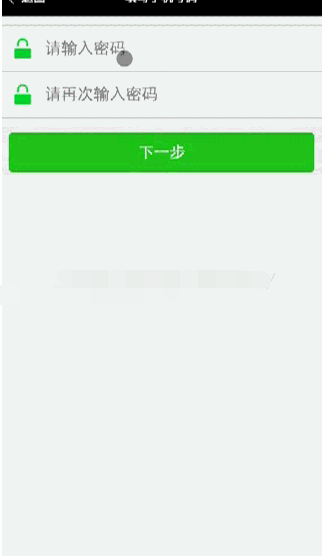
[目录结构]
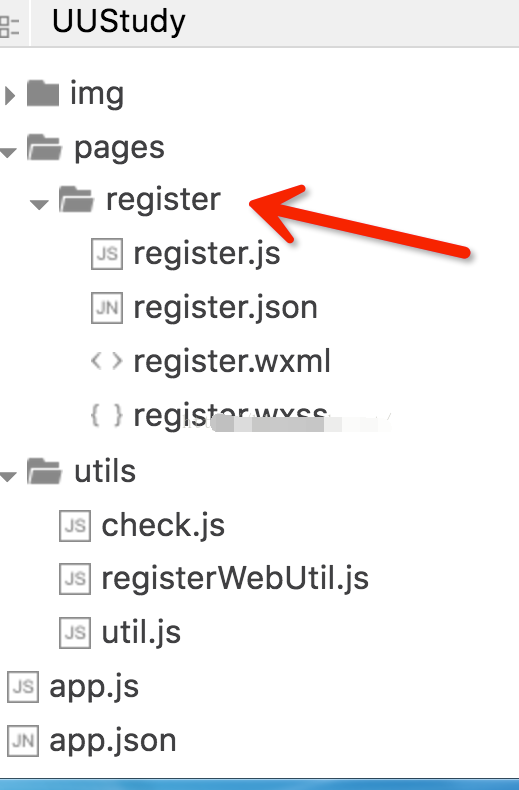
[贴代码]
register.wxml
register.wxss
.container-hang {
display: flex;
flex-direction: row;
background-color: #fff;
}
register.js
var app = getApp()
// var step = 1 // 当前操作的step
var maxTime = 60
var currentTime = maxTime //倒计时的事件(单位:s)var interval = nullvar hintMsg = null // 提示var check = require("../../utils/check.js")var webUtils = require("../../utils/registerWebUtil.js")var step_g = 1var phoneNum = null, identifyCode = null, password = null, rePassword = null;Page({data: {windowWidth : 0,
windoeHeight : 0,
icon_phone: "../../img/icon_phone.png",
input_icon: "../../img/input_icon.png",
icon_password : "../../img/icon_password.png",location : "中国",nextButtonWidth: 0,step: step_g,
time: currentTime
},
onLoad: function(){
step_g = 1
var that = this
wx.getSystemInfo({
success: function(res) {
that.setData({
windowWidth : res.windowWidth,
windowHeight : res.windowHeight,
nextButtonWidth: res.windowWidth - 20
})
}
})
},
onUnload: function(){
currentTime = maxTime
if(interval != null){
clearInterval(interval)
}
},
nextStep :function(){
var that = this
if(step_g == 1){
if(firstStep()){
step_g = 2
interval = setInterval(function(){
currentTime--;
that.setData({
time : currentTime
})
if(currentTime <= 0){
clearInterval(interval)
currentTime = -1
}
}, 1000)
}
}else if(step_g == 2){
if(secondStep()){
step_g = 3
clearInterval(interval)
}
}else{
if(thirdStep()){
// 完成注册
wx.navigateTo({
url: \'../home/home\'
})
}
}
if(hintMsg != null){
wx.showToast({
title: hintMsg,
icon: \'loading\',
duration: 700
})
}
this.setData({
step: step_g
})
},
input_phoneNum: function(e){
phoneNum = e.detail.value
},
input_identifyCode: function(e){
identifyCode = e.detail.value
},
input_password: function(e){
password = e.detail.value
},
input_rePassword: function(e){
rePassword = e.detail.value
},
reSendPhoneNum: function(){
if(currentTime < 0){
var that = this
currentTime = maxTime
interval = setInterval(function(){
currentTime--
that.setData({
time : currentTime
})
if(currentTime <= 0){
currentTime = -1
clearInterval(interval)
}
}, 1000)
}else{
wx.showToast({
title: \'短信已发到您的手机,请稍后重试!\',icon : \'loading\',duration : 700})
}
}
})
function firstStep(){ // 提交电话号码,获取[验证码]if(!check.checkPhoneNum(phoneNum)){hintMsg = "请输入正确的电话号码!"return false
}
if(webUtils.submitPhoneNum(phoneNum)){
hintMsg = null
return true
}
hintMsg = "提交错误,请稍后重试!"
return false
}
function secondStep(){ // 提交[验证码]
if(!check.checkIsNotNull(identifyCode)){
hintMsg = "请输入验证码!"
return false
}
if(webUtils.submitIdentifyCode(identifyCode)){hintMsg = nullreturn true}
hintMsg = "提交错误,请稍后重试!"
return false
}
function thirdStep(){ // 提交[密码]和[重新密码]console.log(password + "===" + rePassword)if(!check.isContentEqual(password, rePassword)){hintMsg = "两次密码不一致!"return false}
if(webUtils.submitPassword(password)){
hintMsg = "注册成功"
return true
}
hintMsg = "提交错误,请稍后重试!"
return false
}
register.json
[plain] view plain copy print?在CODE上查看代码片派生到我的代码片{"navigationBarBackgroundColor": "#000","navigationBarTitleText": "填写手机号码","enablePullDownRefresh": false,"navigationBarTextStyle": "white"}
check.js
// 检测是否有输入
function checkIsNotNull(content){
return (content && content!=null)
}
// 检测输入内容
function checkPhoneNum(phoneNum){
console.log(phoneNum)
if(!checkIsNotNull(phoneNum)){
return false
}
return true
}
// 比较两个内容是否相等
function isContentEqual(content_1, content_2){if(!checkIsNotNull(content_1)){return false}
if(content_1 === content_2){
return true
}
return false
}
module.exports = {
checkIsNotNull : checkIsNotNull,
checkPhoneNum : checkPhoneNum,
isContentEqual : isContentEqual
}
registerWebUtil.js
// 提交[电话号码]
function submitPhoneNum(phoneNum){
// 此处调用wx中的网络请求的API,完成电话号码的提交return true}
//提交[验证码]
function submitIdentifyCode(identifyCode){// 此处调用wx中的网络请求的API,完成短信验证码的提交return true}
// 提交[密码],前一步保证两次密码输入相同function submitPassword(password){//此处调用wx中的网络请求的API,完成密码的提交return true}
module.exports = {
submitPhoneNum : submitPhoneNum,
submitIdentifyCode : submitIdentifyCode,
submitPassword : submitPassword
}
以上就是如何在微信小程序开发的时实现手机号注册功能的全部内容了,大家都学会了吗?
 扫一扫,访问手机页面

2026-03-09

2026-03-07
2026-03-08

2026-03-09